> For the complete documentation index, see [llms.txt](https://docs.elastiflow.com/llms.txt). Markdown versions of documentation pages are available by appending `.md` to page URLs; this page is available as [Markdown](https://docs.elastiflow.com/snmpcoll/configuration/def_devices/device-file-encryption.md).
# Device File Encryption
NetObserv SNMP supports user friendly and secure device file encryption using sops and AGE.
### Getting Started
#### Environmental Dependencies
1. Ensure [sops](https://github.com/getsops/sops) is installed in your local environment:
```shell
# Change sops-v3.8.1.linux.amd64 if needed based on your environment
curl -LO https://github.com/getsops/sops/releases/download/v3.8.1/sops-v3.8.1.linux.amd64
sudo mv sops-v3.8.1.linux.amd64 /usr/local/bin/sops
sops --version # to verify install
```
2. Also ensure [age](https://github.com/FiloSottile/age) is installed in your local environment to edit via CLI:
```shell
sudo apt install age # Debian based linux
brew install age # macos
age --version # to verify install
```
#### SNMP Device Encryption Configuration Settings
Please visit [Device File Encryption Settings](/snmpcoll/configuration/def_devices/device-file-encryption/device-file-encryption-settings.md) to learn more.
### Recommended Usage
#### Setup
The easiest and most recommended way to get started is to simply set the following as below:
```shell
EF_INPUT_SNMP_DEVICE_DEFINITIONS_SECURE_STORE_ENABLE=true
EF_INPUT_SNMP_DEVICE_DEFINITIONS_SECURE_STORE_CREATE=true
EF_INPUT_SNMP_DEVICE_DEFINITIONS_SECURE_STORE_TYPE="sops"
EF_INPUT_SNMP_DEVICE_DEFINITIONS_SECURE_STORE_PASSWORD="YourPassword"
EF_INPUT_SNMP_DEVICE_DEFINITIONS_SECURE_STORE_PRIVATE_KEY_FILE_PATH="/etc/elastiflow/snmp/.age/key.age"
EF_INPUT_SNMP_DEVICE_DEFINITIONS_SECURE_STORE_PUBLIC_KEY_FILE_PATH="/etc/elastiflow/snmp/.age/public-age-keys.txt"
```
The following behavior will occur when the SNMP collector is next restarted:
1. Generate password protected age keys at the configured file paths.
2. Encrypt device configuration .yaml files using those keys.
Once successfully encrypted with sops, the following device configuration file:
```yaml
example1:
ip: 192.0.2.1
port: 161
poll_interval: 60
timeout: 3000
retries: 2
exponential_timeout: false
version: 2c
communities:
- public
device_groups:
- cisco_c1000
example2:
ip: 192.0.2.2
port: 161
poll_interval: 60
timeout: 3000
retries: 2
exponential_timeout: false
version: 3
v3_credentials:
- username: elastiflow
authentication_protocol: sha
authentication_passphrase: efauthpassword
privacy_protocol: des
privacy_passphrase: efprivpassword
device_groups:
- cisco_c1000
```
will look like this:
```yaml
example1:
ip: ENC[AES256_GCM,data:gpjHnCJA1nrz,iv:2lYG8FRUkx71aRoFHaEVcnt/6xbZPXzwuvWZTPwkFfo=,tag:SHmLptFdH3W08cmz42cTGQ==,type:str]
port: ENC[AES256_GCM,data:Qj4t,iv:CuWtdUOnCUnWASps/8S4pt7oALlOJkaLLnqgu3IOagU=,tag:ieulT2ZnV3JeatzKTggQ6Q==,type:int]
poll_interval: ENC[AES256_GCM,data:L2I=,iv:rAUV9i3BWCHIOh+/YrkYAhkeVyBAhvA5ZPFQTA29maY=,tag:VqhjZnn5wOtiBUpxiZRHiA==,type:int]
timeout: ENC[AES256_GCM,data:90Vgiw==,iv:qNxs1ixW8Fk8hkZwqDegZD2j+TdGxUxTvuoZtnIT7Zs=,tag:JMKKLmKcjob5sNfwxw8Ohg==,type:int]
retries: ENC[AES256_GCM,data:pg==,iv:ntHpk0LQ4EEJXxrYMyVgc18/8rJpZeu5zb9TwxrDVns=,tag:jbSzyKgIaH8pZCi9vhpcRw==,type:int]
exponential_timeout: ENC[AES256_GCM,data:70ObBtA=,iv:a7/hLZdXrYqkT3Ttqp7fZVj07IepGYj22WPYYxKubfA=,tag:jZWy+yh51M9XSJ2+IAg7uQ==,type:bool]
version: ENC[AES256_GCM,data:dtM=,iv:Z3CUC9LL7nScQzyGTHdz0ekCJ5EOKUz0H2LWU+E9np0=,tag:WH5zbMQNE0DORcVVC/Ue2A==,type:str]
communities:
- ENC[AES256_GCM,data:66KS7TMJ,iv:1d78b98arCfjEAIWJBl21sHmrVZBF078yoPp8hREizs=,tag:IYA+3w4+i/lG5aIEbWDz/w==,type:str]
device_groups:
- ENC[AES256_GCM,data:S58lX6Cy0Z+AhLA=,iv:SH8KJ1w6d4tHpSVm1PqJ/4XrVhUo6hZWFhGCMQVAJbg=,tag:q5Lsuvfv/mgv/fwX1ezlIA==,type:str]
example2:
ip: ENC[AES256_GCM,data:WBH+84Cw2Zr8,iv:wdXcIaqrvTPscE50IhJh+JNHBKhhxAqlAR8oSBh0edg=,tag:dsUAIcVGLbm9oIj2XQMoPA==,type:str]
port: ENC[AES256_GCM,data:OWMD,iv:bTRT7fufGSYjY+5hMgCOR73bypq113INIPAa5srQAzk=,tag:/0iO86Ky4WxLCFHPpfEqLg==,type:int]
poll_interval: ENC[AES256_GCM,data:WGQ=,iv:Yo06+WSNM3FVsxNq4D1DuMwzw33Z3Wkb+jaejl1fFlc=,tag:UgdkI7WTdRvYmlH+RwYAcg==,type:int]
timeout: ENC[AES256_GCM,data:8aodzQ==,iv:GC5cVU8ogqdV3wqVGudQL8kiw6vTwDRgPKOsfzZaMHs=,tag:P8pGX+BCrhQja+ggcCzdPA==,type:int]
retries: ENC[AES256_GCM,data:Sg==,iv:6R/UTJ/UxDwOoYIwxdaNSMb8FsLdEHOvhCVPxXucr5w=,tag:ZHT31wPKwIoHQsnFueZsTA==,type:int]
exponential_timeout: ENC[AES256_GCM,data:MAWJFDo=,iv:ajyXshSJN6ppJs16/8VZ49sOsd0LGrIbX/tdFDrFhdw=,tag:Z+oKJiMHywhzMEFyoW5rVw==,type:bool]
version: ENC[AES256_GCM,data:nQ==,iv:whZat6BvmokGSuc99ZEWSCHY/f7hrEgbTXWPeYO7tUA=,tag:rPrEPendlnj6KX4cXSpsgg==,type:int]
v3_credentials:
- username: ENC[AES256_GCM,data:U3C33op0xlVI9w==,iv:TBe9m5WLcbJJA3xFeZGsBnfmYde3LqQ+XPrwKVObfxM=,tag:Vk6taTCEG5HUhsrR0xdAEg==,type:str]
authentication_protocol: ENC[AES256_GCM,data:svZM,iv:aKP8V1z1MZpytsqTFnMXEmIEdD10WOrQSYv0Jy5gl24=,tag:TcPJoustC+4jgCN/46gOwg==,type:str]
authentication_passphrase: ENC[AES256_GCM,data:50joswMhZyQLIav1jsM=,iv:Fk5UWMmb2yXl7cH0VW314qdyTAHGMXcWXYCAmK/OWLY=,tag:mX672yhoXFAv0jL1xAfyHw==,type:str]
privacy_protocol: ENC[AES256_GCM,data:lXm0,iv:CVfu7stiua+8t6GqJJ9xeShwpkWb5n3ivwVZOHNqyMs=,tag:E4lnqh9xw19C/yxivypciQ==,type:str]
privacy_passphrase: ENC[AES256_GCM,data:P39UX0UKK8kesM23Yug=,iv:CCh4x6Tp2vbkRfPqQ/cXyG99uHGbKaR1W6mBvNnDTBQ=,tag:nCE9XfaIWNiFhYSGeObqpw==,type:str]
device_groups:
- ENC[AES256_GCM,data:ayAD/+D3+Et71x0=,iv:r9HuTYYKPhPeNClUpJDvB71MJ1H7AvrFGamSKTbOwJw=,tag:h++ge/puz/KajkqJibjLNQ==,type:str]
sops:
kms: []
gcp_kms: []
azure_kv: []
hc_vault: []
age:
- recipient: age1l209t8c77xaysqjy5usjzknv4fzgcj4x65gjwnvrgx0chlrk6c6qna9r9d
enc: |
-----BEGIN AGE ENCRYPTED FILE-----
YWdlLWVuY3J5cHRpb24ub3JnL3YxCi0+IFgyNTUxOSBzUEx4cUVrK0ZRMkdBUHJi
UzlOUUx1R3BCL3lRTmgvSXQ2N2ZDQk1TemcwCkk1clBnRGV0cmFXYWNnMlZGUFEz
akttUlR1VmgzL2taWUdJMzgwZzBBaDAKLS0tIGR6K1dtRVZMTnhJbGVPdVhNMXRD
QkJPZG5ISlVZclRIYmQ5Y2U4UnVnYUUKlX+RKl/l+p4Banls4tIBcdi3N0XFNxVd
g42uDbAxdy8rfBc4elKlkv4C8ruC6xh3/yBZyHeBceqjqWxkOSTVyA==
-----END AGE ENCRYPTED FILE-----
lastmodified: "2024-06-11T02:16:28Z"
mac: ENC[AES256_GCM,data:8ictB7la+azEBuLwotnHp4gEZjLb8bTEkDfyaFOmKOb2+AVxDhQ7kNvoBUrJ59ZqPB4xxveFHmCF1El1mYWMEonFuHsde9HZzgpeGNu2dlONonmjOlGlrisfcIivYCAGn+bD9DaGzkP/YMO/zjdJaCgwf+6WkxrviV29IAPoAG8=,iv:tAtcC+dMzSOFbc1EA++Q4GTDmPfjnVaWZdetkPkyhzw=,tag:gy1dLA4usoMMjnBjDlhsaQ==,type:str]
pgp: []
unencrypted_suffix: _unencrypted
version: 3.8.1
```
#### Editing Encrypted Files
**It is important to note that encrypted files should not be manually edited outside of the sops CLI editor.**
To securely edit device configuration files, please use sops via the CLI:
* Non-password protected key:
```shell
SOPS_AGE_RECIPIENTS=$(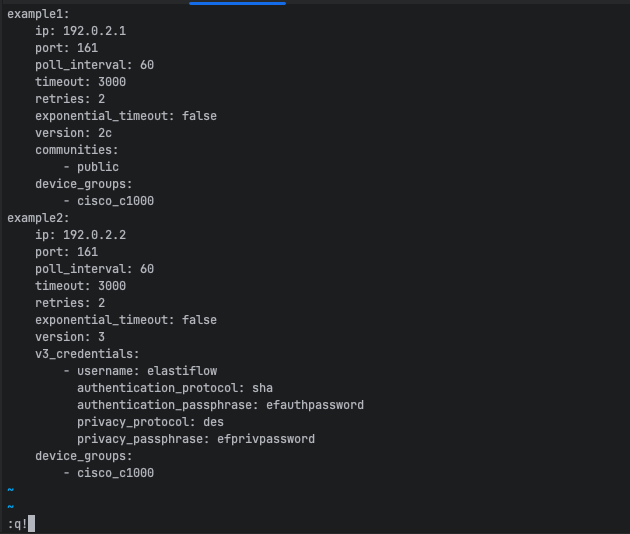 * Using nano instead of vim:
```shell
EDITOR=nano \
SOPS_AGE_RECIPIENTS=$(&goal=
```
`ask` is the immediate question: it should be specific, self-contained, and written in natural language.
`goal` is what the user is ultimately trying to achieve, the reason they need the answer. Sharing it helps GitBook give you a better, more relevant answer. A goal is most helpful when it describes the outcome the user wants rather than restating the question. For example, with `ask=how do I create an API token`, a goal like `automate deployments from our CI pipeline` lets GitBook tailor the answer to that use case.
The response will contain a direct answer to the question and relevant excerpts and sources from the documentation.
Use this mechanism when the answer is not explicitly present in the current page, you need clarification or additional context, or you want to retrieve related documentation sections.
* Using nano instead of vim:
```shell
EDITOR=nano \
SOPS_AGE_RECIPIENTS=$(&goal=
```
`ask` is the immediate question: it should be specific, self-contained, and written in natural language.
`goal` is what the user is ultimately trying to achieve, the reason they need the answer. Sharing it helps GitBook give you a better, more relevant answer. A goal is most helpful when it describes the outcome the user wants rather than restating the question. For example, with `ask=how do I create an API token`, a goal like `automate deployments from our CI pipeline` lets GitBook tailor the answer to that use case.
The response will contain a direct answer to the question and relevant excerpts and sources from the documentation.
Use this mechanism when the answer is not explicitly present in the current page, you need clarification or additional context, or you want to retrieve related documentation sections.